
New: “Ask us” for bigger orders and product videos right from the list
Two new features that make shopping at Hurtownia Kesi faster: a quick request for an individual offer on bigger orders and product videos right from the list – without opening the product page.
1“Ask us” – an offer for bigger orders
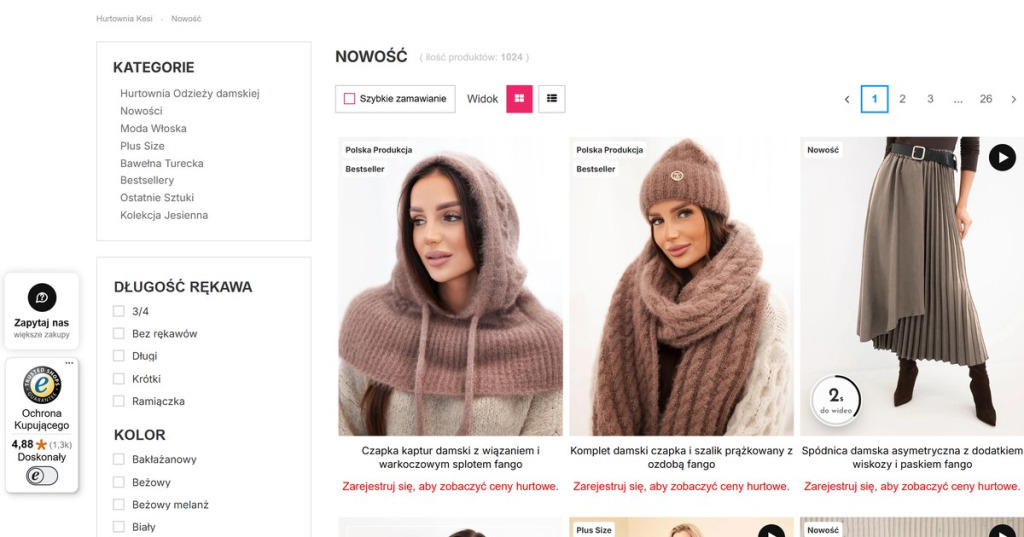
In the bottom left corner of every page, just above the Trusted Shops badge, you will find a white “Ask us” card. Click it, choose the planned order value, how often you order and what you are interested in – and send a short request. We will prepare individual terms for you.
2Product videos right from the list
On the product list – e.g. in New arrivals – photos with a video have a ▶ icon. Hover over such a photo: a countdown appears in the bottom left corner, and after 3 seconds the video plays in place of the photo. Move the cursor away and the video stops.
3Who is it for?
For all wholesale customers – both regular ones and those planning their first bigger order.
Visit New arrivals and hover over a photo with the ▶ icon – and if you are planning a bigger order, click “Ask us”.
New arrivals